Adobe is now inside Claude and ChatGPT, and that changes how designers can use AI. For years, using AI in a design workflow meant leaving your design tools: you generated something in a chatbot, downloaded it, dragged it into Photoshop and fixed it by hand. In 2026 that has flipped. Adobe's tools now come to the chatbot, and on 10 November, at Adobe MAX, Adobe previewed something bigger — AI agents that work directly inside your Photoshop, Illustrator, Premiere and After Effects project files.
For designers, this is a real change in how everyday work gets done. This article sets out what has happened, based on Adobe's own announcements wherever we could read them, why it matters to designers, and where the limits are.
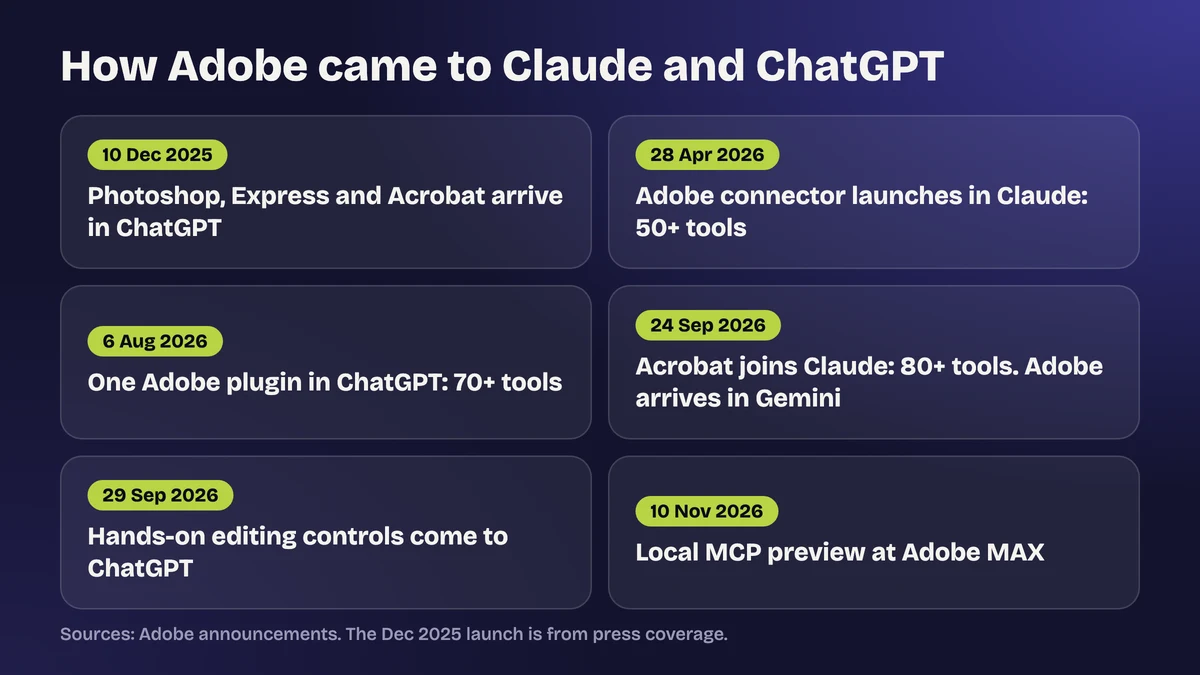
Six dates that brought Adobe into the chatbots
The dates above come from Adobe's own posts — the Claude connector launch, the unified ChatGPT plugin, the Acrobat and Gemini update, the ChatGPT editing controls and the Adobe MAX announcement. The one exception is the first ChatGPT launch on 10 December 2025, which we know from press coverage.
What Adobe's Claude and ChatGPT integrations change for designers
1. The tools come to the conversation
You describe the job in plain language, and Claude or ChatGPT uses Adobe's tools to do it. Adobe says the Claude connector launched in April with more than 50 tools across Photoshop, Illustrator, Firefly, Express, Premiere, Lightroom, InDesign and Adobe Stock, and that by September it had grown to more than 80 with Acrobat added. The ChatGPT plugin has more than 70. The examples Adobe gives are everyday production jobs: portrait retouching, social posts built from Express templates and resizing videos for different platforms.
2. You can edit by hand inside the chat
This is the part designers will notice first. In September Adobe added interactive editors. In ChatGPT you can select an object or brush over an area, ask for a focused change — Adobe's example is removing a napkin from a table — and then fine-tune the result with sliders for hue, saturation, contrast and more. A PDF editor lets you revise text, highlight and annotate in place. Adobe says edits flow back into the chat as context, so you do not have to explain your work again. Claude got a similar PDF editor, a layer-based editor for Express designs and a Document Review skill.
3. Agents can work on your real files — in preview
At Adobe MAX, Adobe previewed local MCP integrations. Adobe describes them as letting creative professionals direct their preferred third-party agent to make changes locally to their Photoshop, Illustrator, Premiere and After Effects project files, with layers, sequences and compositions staying editable.
That last part is why designers should pay attention. The common complaint about AI tools is that they hand back a flattened image you cannot edit. An agent that works in your layered project file is a very different thing. But it is a preview: Adobe's own announcement does not say which agents are supported at launch, what it costs or which plans include it, and Adobe vice president Deepa Subramaniam told TechCrunch the company is still working out where to draw the line on what to expose.
Why this is a big impact for designers
What follows is our view, not a claim by Adobe:
- The repetitive part of the job gets faster. Resizing one design for every platform, removing backgrounds, basic retouching and converting files are the tasks that eat hours. These are exactly the examples Adobe leads with.
- You can look at more options sooner. A first draft in minutes means more of your time goes on choosing and refining, which is where a designer adds the most value.
- Output you can edit keeps you in control. If agents work in real layered files, the designer stays the author and the AI becomes a fast assistant.
- The job moves toward direction and judgement. Knowing what is on brand, what is good and what is wrong matters more when producing a first version is cheap.
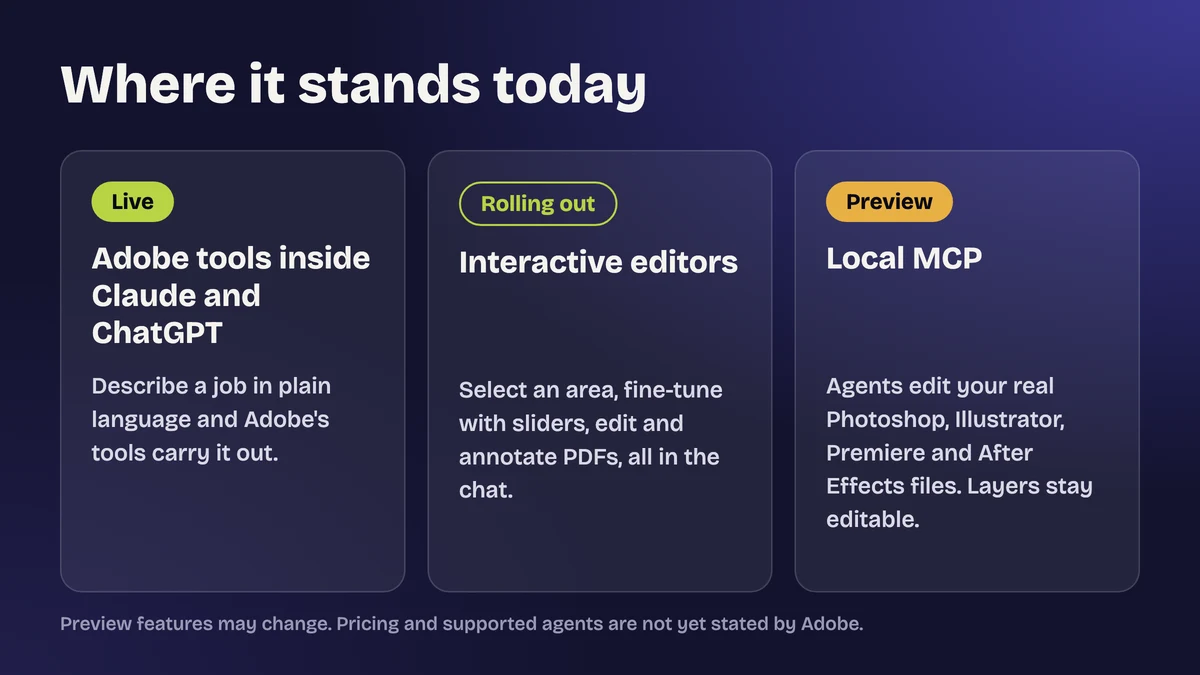
Where it stands today
It helps to keep the three stages apart. The first two are live now. The third is the one that gets the headlines, and it is still a preview that may change.
What does not change
- Adobe says so itself. Its posts point users to Photoshop and the other apps for advanced editing and pixel-level precision. When ChatGPT's first Adobe apps launched in December, press coverage called the experience limited.
- Taste, concept and brand judgement stay human. So does Arabic typography, which is worth testing carefully with your own work before you rely on any tool.
- Pricing is not stated. Adobe's posts say you can start as a guest, and that signing in with an Adobe account unlocks more — higher usage limits and more tools in Claude, generative features and your Creative Cloud files in ChatGPT. They do not give a price, and Adobe's Claude post adds that compatibility and availability vary. Check your own account rather than assume.
- Client files need care. Before you upload client work to any AI tool, check your contract and the tool's data terms. Our guide to choosing an AI video tool has a checklist that applies here too.
How to use Adobe in Claude and ChatGPT: five things to try this week
- Add Adobe's plugin to Claude or ChatGPT. Adobe's posts explain the setup, and a guest start is possible.
- Begin with low-risk jobs: resize a social post for several platforms, remove a background from a product photo, merge or compress a PDF.
- Time the same job in your normal workflow and in the chat, and keep whichever is faster and better.
- Always keep your originals, and label anything that is AI-generated.
- Watch the local MCP preview. If it delivers editable layers in your own files, it will matter more than everything above.
One more Adobe announcement, for a different audience
On 4 November Adobe also said its CX Enterprise Coworker is available in ChatGPT (as a plugin), Claude, Gemini for business and Microsoft Copilot. That is a separate product for large enterprise marketing teams, covering things like campaign analysis and customer-journey planning, and it is not about design tools. You can read Adobe's announcement if that is relevant to you.
Our take
For designers, the direction is clear: with Adobe in Claude and ChatGPT, the tools you already know are moving into the places where people already work, and the next step is agents working on your real files. AI for designers will not replace a designer's eye, but it will change how much of the day goes on production and how much goes on thinking. If you want help turning tools like these into a faster, better design process for your brand, talk to us or see our branding work.