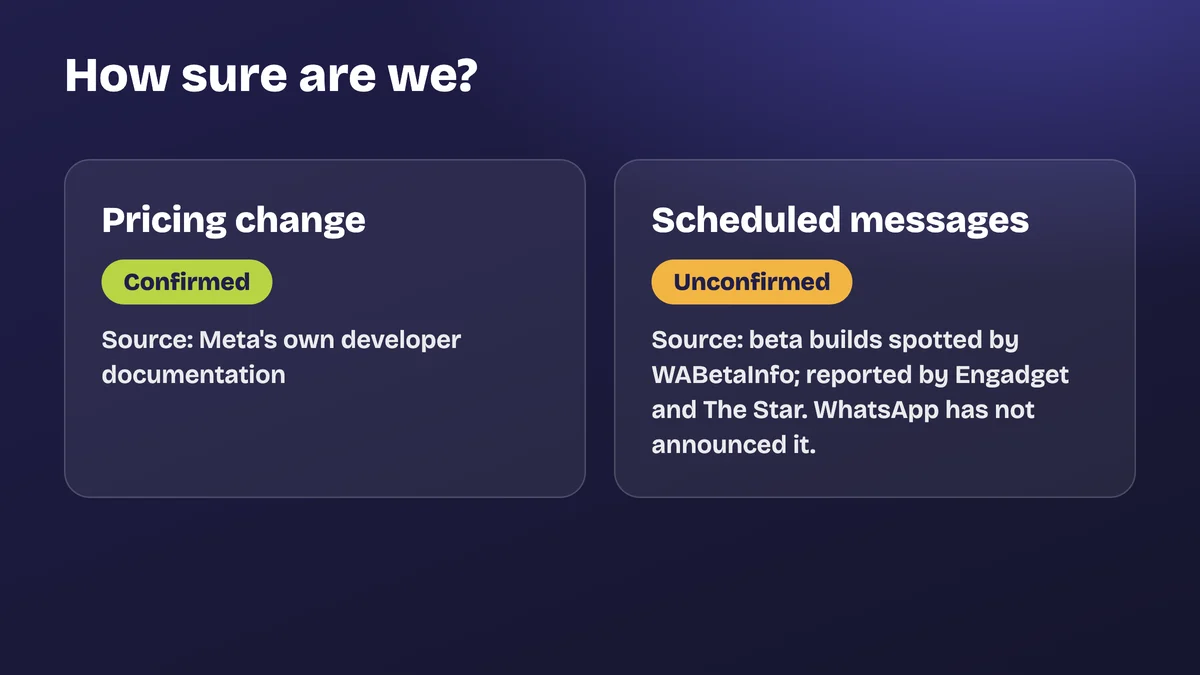
Two WhatsApp stories are going around Oman's business groups this week. One says replying to customers on WhatsApp Business is no longer free. The other says you can now schedule messages. They are not equally reliable, so we checked both against their sources before writing this. The short version: the pricing change is confirmed by Meta's own documentation, while scheduled messages are a beta feature that WhatsApp has not officially announced.
How Sure Are We? Two Updates, Two Levels of Proof
We use two labels in this article. Confirmed means it is written in Meta's own developer documentation. Unconfirmed means it comes from beta testers and news reports, and WhatsApp has not announced it. Keep that difference in mind when you plan, because you can budget for the first and should only prepare for the second.
Update 1 (Confirmed): Service Replies Are Now Billable
This applies to the WhatsApp Business Platform, the API version of WhatsApp that businesses use through a provider, usually for chatbots, shared team inboxes and automated flows. Meta's pricing documents do not cover the free WhatsApp Business app on a phone, so if that is what you use, confirm with your provider or with Meta before assuming anything changes for you.
What Changed
Here is what Meta's pricing documentation says, as of this week:
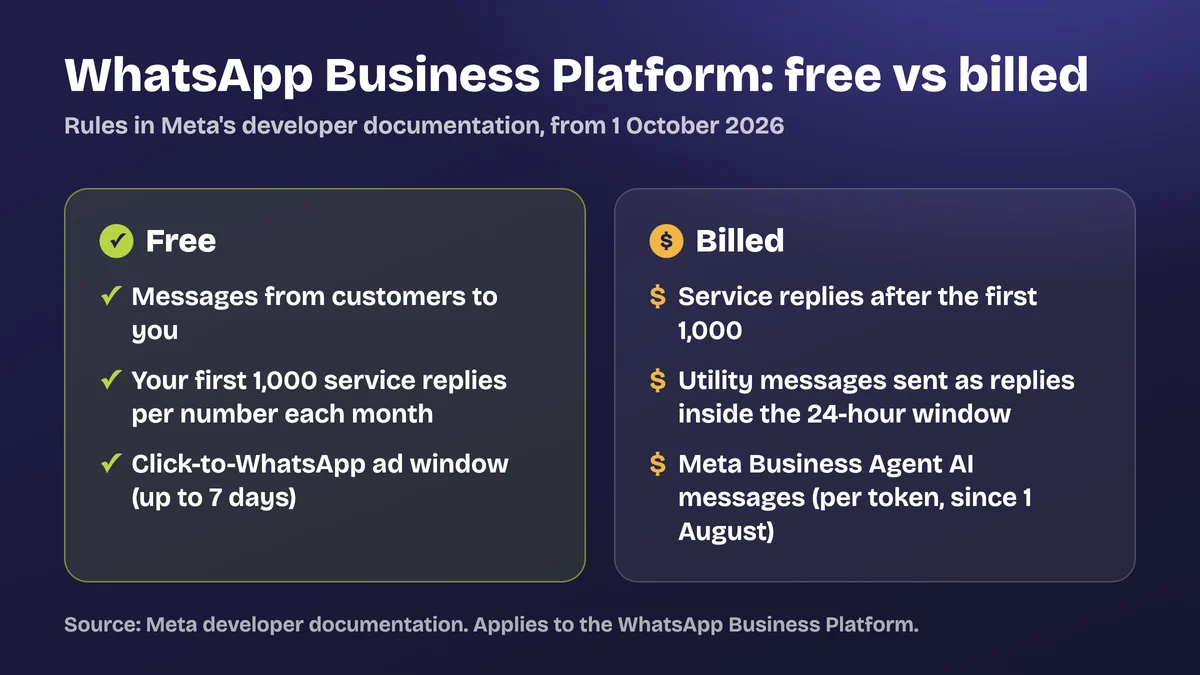
- From 1 October 2026, service messages, meaning your replies to a customer's question inside the 24-hour customer service window, are billable.
- Utility messages, such as an order update or delivery notice, that you send as a reply inside that 24-hour window are billable too.
- Each business phone number gets 1,000 free service messages per month. The allowance does not roll over to the next month.
- Messages that customers send to you remain free.
- The window opened by a Click-to-WhatsApp ad stays free. Meta's documents say it can last up to 7 days, longer than the usual 24 hours.
- There are no volume discount tiers for service messages.
- The price depends on the recipient's market. Oman is listed as a standalone market, with higher utility and authentication rates from 1 October.
- Meta says rates may be updated quarterly, and it bills in US dollars or 15 other currencies. The Omani rial is not among them.
- A valid payment method must be on file by 30 September, or message delivery stops.
Meta's non-template messages page has the detail on service messages, and its rate card lists the prices by market. We are deliberately not quoting a per-message price here, because rates differ by market and can change. Check the current card for the countries your customers are in.
What This Looks Like in Practice
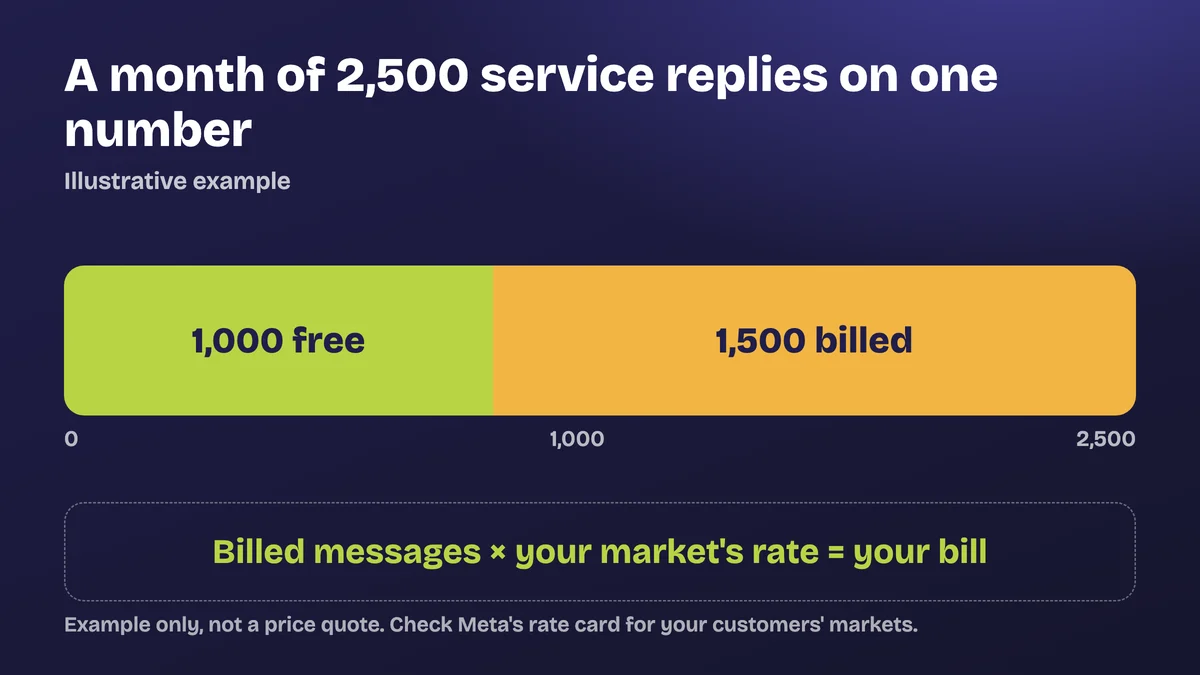
Take one business number that sends 2,500 service replies in a month. The first 1,000 are free and the remaining 1,500 are billed at the recipient market's rate. That is an illustration of how the allowance works, not a price quote. A busy support number can pass 1,000 quickly, especially in a season like Ramadan or White Friday.
There is one more cost to watch if you use Meta's AI agent. According to Meta's documentation, Meta Business Agent is billed per token, at $2.00 per million tokens from 1 August, which Meta estimates at roughly 4 to 5 cents for a typical message. If an AI agent answers your customers, the cost grows with every conversation.
One Thing That Does Not Add Up
A word of caution about sources. Meta's marketing pricing page and its developer documentation do not fully agree on how some of these rules are described. We followed the developer documentation, which is the technical reference providers build their billing on, but the safest step is to ask your provider to confirm in writing how your account will be billed.
A Practical Checklist for Oman Businesses
- Find out which WhatsApp you actually use: the free Business app, or the Business Platform through a provider.
- Ask your provider how the change appears on your invoice, and in which currency.
- Make sure a payment method is on file, because delivery can stop without one.
- Estimate your monthly service replies per number and compare them with the 1,000 free allowance.
- Send customers to WhatsApp from Click-to-WhatsApp ads, whose window stays free.
- Trim unnecessary messages, such as thank-you replies that need no answer, and combine information into one message.
- Review AI-agent costs if you use one.
- Re-check the rate card every quarter.
Update 2 (Unconfirmed): Scheduled Messages
The second story is about a feature many of us have wanted for years: writing a message now and sending it later. This one is a beta report, not an announcement.
What Has Been Reported
WABetaInfo, a site that tracks unreleased WhatsApp features, reported on 12 October that a scheduled-messages option was appearing for Android beta testers on version 2.26.40.7. Engadget covered the same discovery that day, and The Star followed on 15 October with a report of a newer beta, 2.26.41.9, with the feature in both mobile and desktop betas.
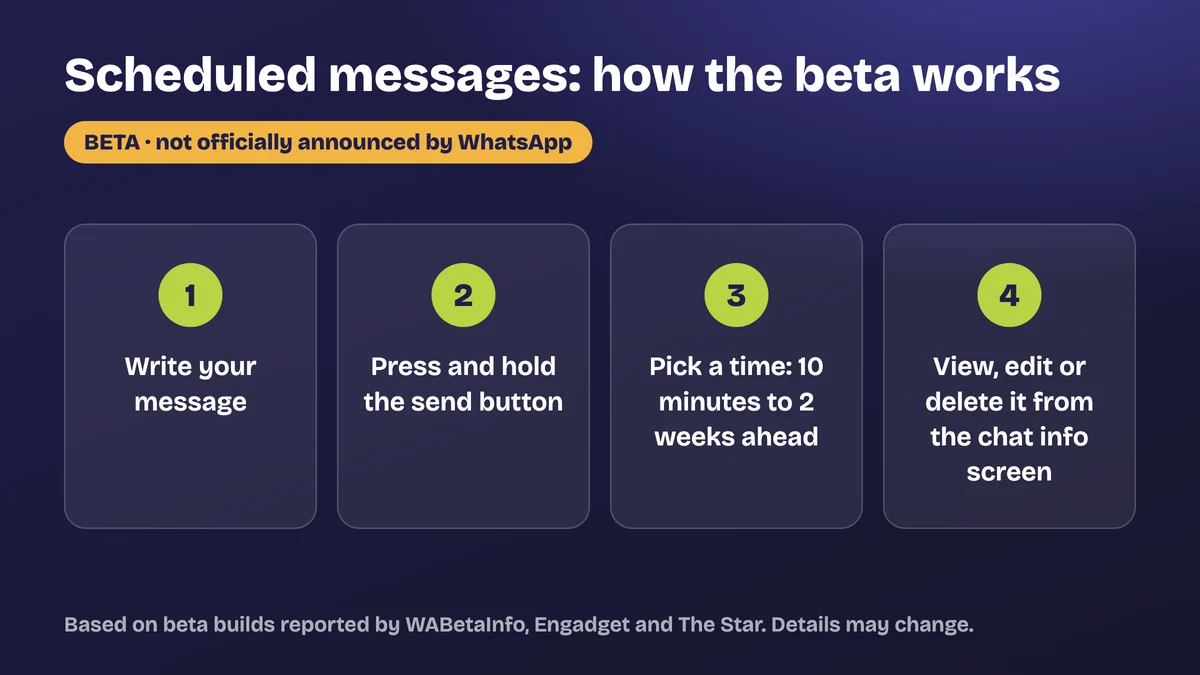
From those reports, the feature appears to work like this:
- You write your message as normal.
- You press and hold the send button to open the scheduling option.
- You choose a time, from a few minutes ahead to about two weeks.
- You can review, edit or delete the scheduled message from the chat's info screen.
Here is what we could not find: any statement from WhatsApp itself. None of the reports says the feature is for businesses, and none says it reaches the Business Platform API. Beta features can change or be removed before release, so treat this as a preview rather than a plan.
Ideas If It Launches
If scheduled messages do arrive, small businesses that run their WhatsApp by hand could use them for appointment and booking reminders, follow-ups sent at a sensible hour instead of late at night, and greetings for Ramadan and Eid. If you are preparing for the season, our Ramadan 2027 marketing countdown has the dates. One caveat is worth repeating: only message people who have agreed to hear from you, however you send it.
What to Do This Week
- Treat the pricing change as real and check your setup and invoices now.
- Ask your WhatsApp provider for written confirmation of how billing works for your number.
- Do not build a plan around scheduled messages yet. Watch for an official announcement from WhatsApp.
- If you use WhatsApp for customer service, review how many replies you send and whether each one is needed.
Glomark helps businesses in Oman plan their messaging, social media and campaigns, in Arabic and English. If you want help working out what these changes mean for your customer communication, see our digital marketing and social media management services, or get in touch.
The infographics in this article were designed by Glomark from the sources linked above, and the cover image is an AI-generated illustration made with Higgsfield, not a photograph.